23 January 2026 | IPv4 Blog , Knowledge Hub
How to Report Reassignments in ARIN: Complete Guide
Reporting IPv4 and IPv6 reassignments is required for ARIN compliance and future allocation eligibility. This guide explains ARIN’s relationship model, reporting rules, authorized methods, and step-by-step instructions for creating, modifying, or deleting reassignments through ARIN Online, Reg-RWS, or RWhois.
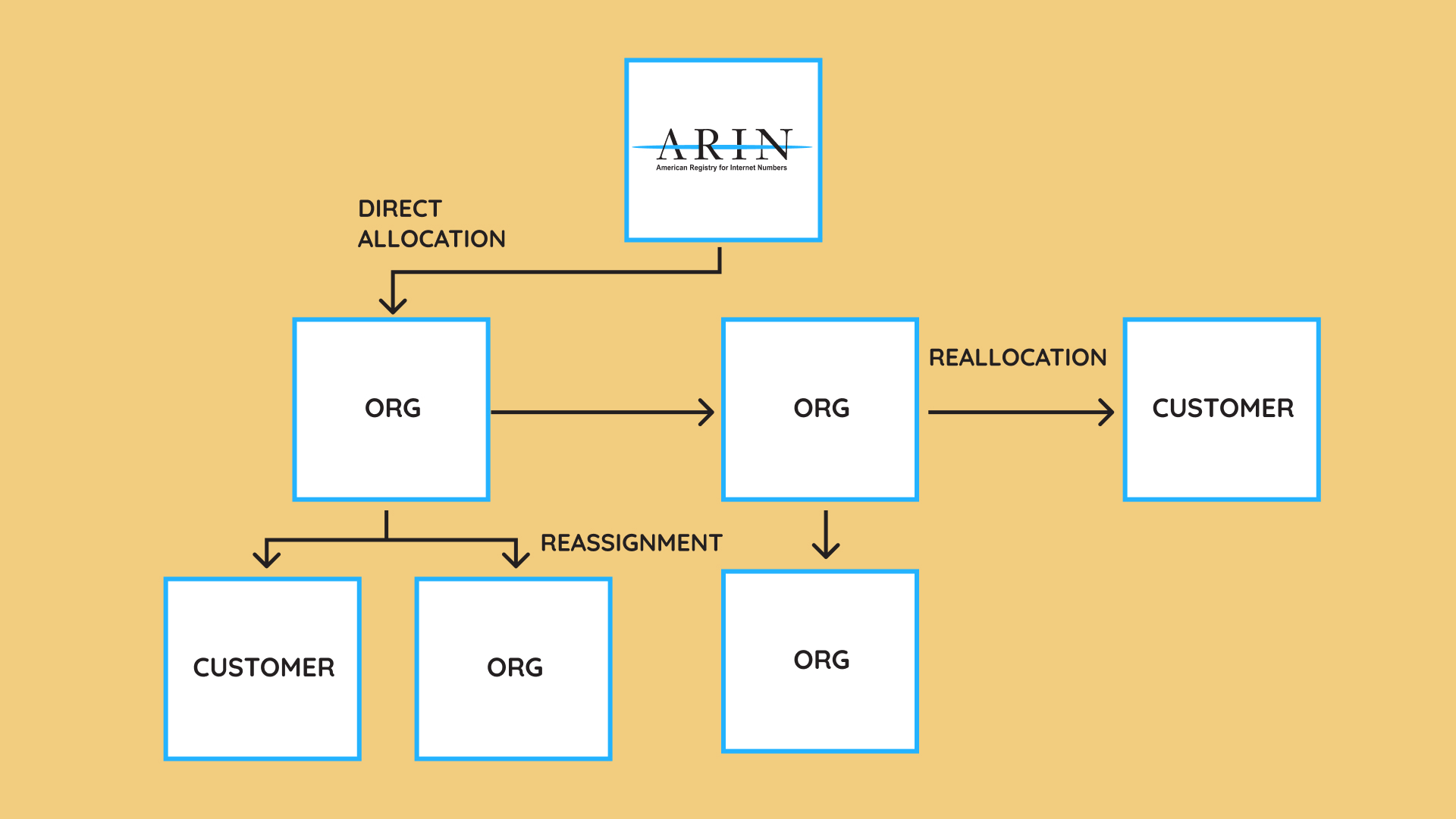
Understanding the ARIN relationship model
Intro:
Before you can report reassignments, it’s important to understand how ARIN views organizations, customers, and the flow of address space. This conceptual foundation helps ensure that your reporting aligns with ARIN policy and avoids compliance issues.
ARIN allocates IP address space to organizations (Org IDs). Those organizations may break the space into smaller pieces through:
- Reallocations: Delegating space to another ISP or organization that may further sub-delegate.
- Reassignments: Delegating space to an end user or internal customer who will not further sub-delegate.
ARIN supports both simple and detailed reassignments:
- Simple: No separate DNS or public Points of Contact
- Detailed: Customer manages their own reverse DNS or wants visibility in Whois
Only allocated space may be reallocated or reassigned; space directly assigned to an end user cannot be subdelegated.
What ARIN requires you to report
Intro:
ARIN uses reassignment data to evaluate your utilization — the primary factor in approving future resource requests. Reporting is a mandatory compliance requirement with very specific thresholds.
Reporting must occur within 7 days for:
- IPv4 subdelegations of /29 or larger
- IPv6 subdelegations of /47 or larger
Special rules apply for residential broadband environments.
Organizations with Org IDs ending in “-Z” cannot receive reallocations or reassignments.
Accurate and timely reporting prevents delays, compliance flags, and restrictions on future IP allocations.
Before you begin
Intro:
Successful reporting requires that your ARIN Online account has the correct authority. If any credentials, PoCs, or Org ID links are missing, ARIN will block your updates.
Create an ARIN Online account
Required for all methods: ARIN Online, API, or RWhois.
Create an API key (if using Reg-RWS)
Enables automated SWIP submissions from provisioning systems.
Confirm your Point of Contact authority
Your ARIN Online user must be linked to a PoC with Admin or Tech authority over the Org ID and all associated resources. Without this, you cannot modify network objects or submit reassignment data.
Methods for reporting reassignments
Intro:
ARIN offers three methods for reporting. The best choice depends on your volume, workflow, automation needs, and internal systems.
Reg-RWS (API / Automated SWIP)
- Best for high-volume or software-integrated workflows
- Used by ISPs, hosting providers, and SaaS platforms
- Enables automated provisioning and lifecycle updates
RWhois (Legacy / Server-based)
- Allows you to publish subdelegation data from your own server
- Strict uptime and accuracy requirements
- Usage continues to decline as organizations migrate to Reg-RWS
ARIN Online (Manual)
- Best for low-frequency updates or small customer bases
- No technical setup required
- Clear and guided submission screens
Creating a reassignment in ARIN Online
Intro:
ARIN Online is the most common method for submitting updates. You can either select available space from a list or manually enter the exact range.
Option A: Choose from free blocks
- Go to IP Addresses → Reassign Addresses
- Select unassigned space under your allocation
- Choose a CIDR size
- Enter customer information
- Submit
Option B: Enter a specific range
- Go to Dashboard → Networks (NETs)
- Expand the block
- Select Reassign
- Enter the exact range
- Complete customer fields
- Submit
Organizations with more than 11,000 NETS must search directly by IP address instead of using list views.
Deleting reassignments
Intro:
Reassignment deletions are permanent and may remove downstream objects. ARIN does not provide an “undo,” so confirm carefully before deleting anything.
Delete a specific reassignment
- Go to IP Addresses → Manage Networks
- Search and include your reassigned networks
- Expand the NET
- Select Delete
Delete all reassignments under a block
- Open the parent NET
- Go to Actions → Delete Reassignments
- Select Delete All Reassignments
- Confirm (irreversible)
Editing existing reassignments
Intro:
Customer information changes frequently. ARIN allows you to update reassignment records to ensure accurate Whois and utilization data.
- Open Manage Networks
- Search for the reassigned block
- Select the Net Handle
- Choose Actions → Modify
- Update customer name, address, PoCs, or metadata
- Save changes
◼️
More on Public Broadband
More of our recent stories about BEAD and public broadband programs
- For up-to-date information on the $42 billion BEAD Program, check Brander Group’s BEAD funding progress dashboard
Other Popular Blog Posts
 https://brandergroup.net/wp-content/uploads/2026/05/ipv4-hidden-tech-boom-role-option-1-featured-scaled.jpg
1429
2560
BG-Editorial
https://brandergroup.net/wp-content/uploads/2021/05/brander-group-buy-IPv4-logo-.svg
BG-Editorial2026-06-03 07:23:002026-06-01 16:07:27Escrow.com & Jake Brander on $15 Billion IPv4 Industry
https://brandergroup.net/wp-content/uploads/2026/05/ipv4-hidden-tech-boom-role-option-1-featured-scaled.jpg
1429
2560
BG-Editorial
https://brandergroup.net/wp-content/uploads/2021/05/brander-group-buy-IPv4-logo-.svg
BG-Editorial2026-06-03 07:23:002026-06-01 16:07:27Escrow.com & Jake Brander on $15 Billion IPv4 Industry https://brandergroup.net/wp-content/uploads/2026/05/May-26-IPv4-Scarcity-Never-Left-The-Market-Just-Forgot.png
929
1693
Brander Group
https://brandergroup.net/wp-content/uploads/2021/05/brander-group-buy-IPv4-logo-.svg
Brander Group2026-05-30 09:04:542026-05-30 20:07:46May: IPv4 Scarcity Never Left—The Market Just Forgot
https://brandergroup.net/wp-content/uploads/2026/05/May-26-IPv4-Scarcity-Never-Left-The-Market-Just-Forgot.png
929
1693
Brander Group
https://brandergroup.net/wp-content/uploads/2021/05/brander-group-buy-IPv4-logo-.svg
Brander Group2026-05-30 09:04:542026-05-30 20:07:46May: IPv4 Scarcity Never Left—The Market Just Forgot https://brandergroup.net/wp-content/uploads/2026/05/NANOG-97-Brander-Group-Sponsor.jpg
1024
1536
Brander Group
https://brandergroup.net/wp-content/uploads/2021/05/brander-group-buy-IPv4-logo-.svg
Brander Group2026-05-28 18:49:232026-05-30 20:05:04Brander Group Sponsors NANOG 97 in Bellevue, WA
https://brandergroup.net/wp-content/uploads/2026/05/NANOG-97-Brander-Group-Sponsor.jpg
1024
1536
Brander Group
https://brandergroup.net/wp-content/uploads/2021/05/brander-group-buy-IPv4-logo-.svg
Brander Group2026-05-28 18:49:232026-05-30 20:05:04Brander Group Sponsors NANOG 97 in Bellevue, WA
